
Last updated: 18 Agustus 2026
How to Deposit on Stockity
To fund your Stockity account, log in, open the Deposit/Cashier menu, choose a payment method, enter an amount (minimum USD 10), then complete payment per the instructions. Successful funds usually reach your trading balance shortly.
Available methods vary by region and can change over time. Always deposit only on Stockity's official cashier page after logging in — never send funds to any individual's personal account claiming to be an "agent".
Before funding, set a capital limit you can genuinely afford to lose. Because fixed-time trading is high risk and most retail users lose money, starting small (near the minimum) is wiser than depositing a large sum up front. Keep every transaction receipt, note the method you used (since withdrawals often must go back to the same method), and avoid depositing money you need for daily living.
| Minimum deposit | USD 10 |
|---|---|
| Account currencies | USD, EUR, IDR |
| Demo account | Yes (virtual balance) |
| Methods | E-wallet · Bank/VA · Crypto |
| Deposit fee | None (0 fee) |
Payment methods (Indonesian users)
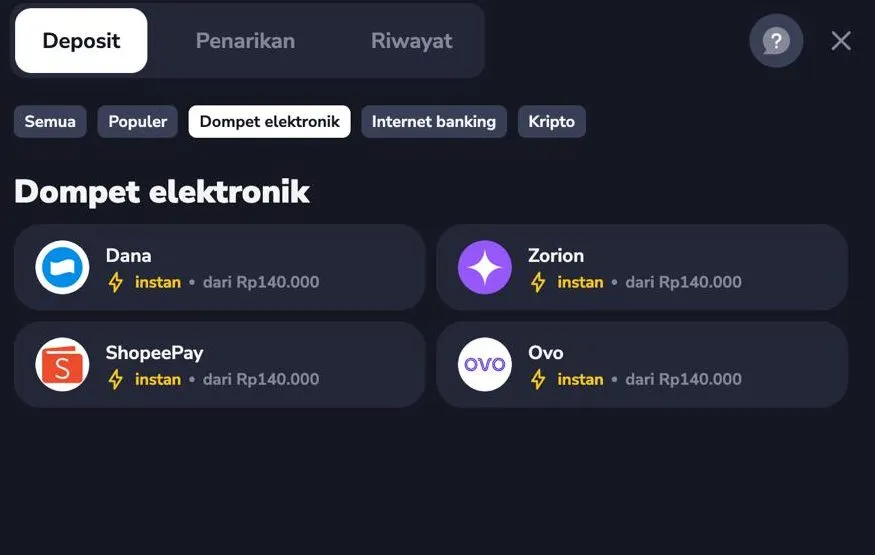
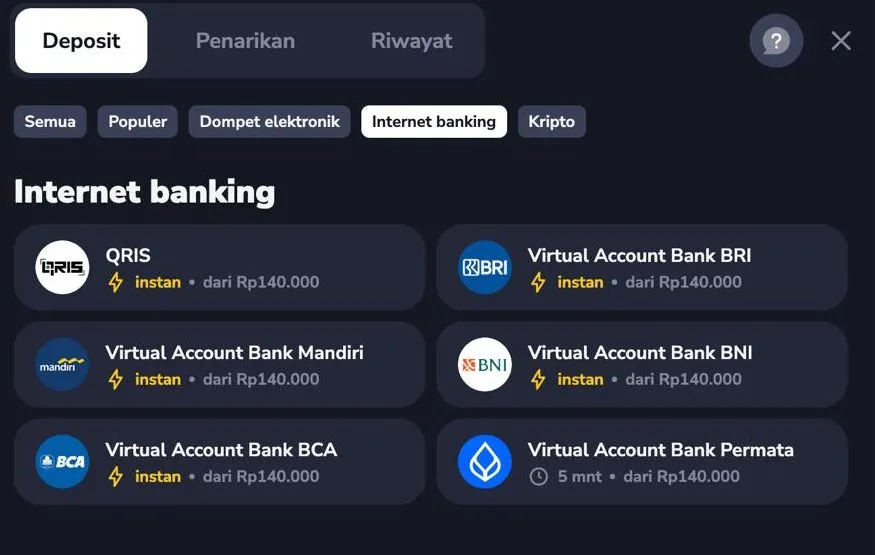
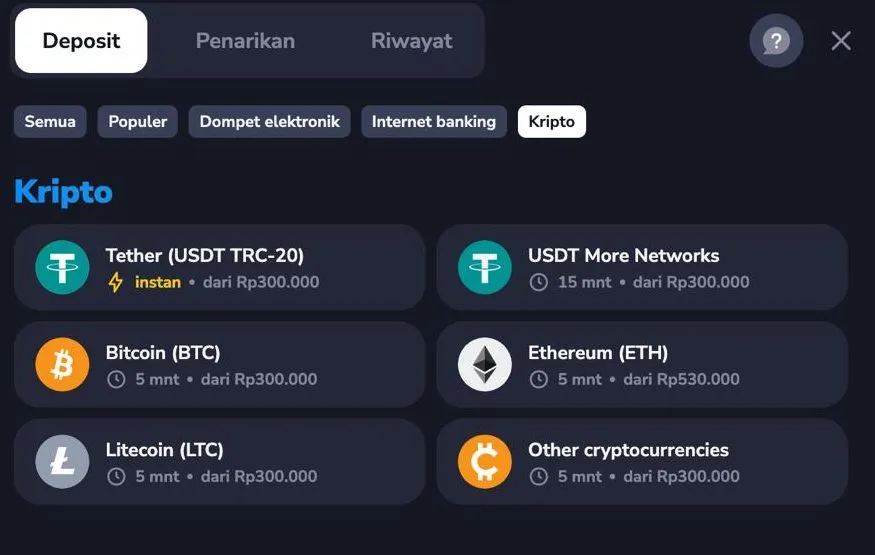
Based on Stockity's cashier for Rupiah accounts, three method groups are available below. Good news: per the cashier, deposits carry no fee (0 fee). Minimums & processing times can change — always check the latest on the official cashier when depositing.
E-wallets
Dana, OVO, ShopeePay, Zorion
Usually instant · minimum from Rp140,000
Internet banking / Virtual Account
QRIS, VA BCA, BRI, BNI, Mandiri, Permata
Instant (Permata up to ~5 min) · minimum from Rp140,000
Crypto
USDT (TRC-20 & other networks), Bitcoin (BTC), Ethereum (ETH), Litecoin (LTC), etc.
±5–15 min · minimum from Rp300,000 (ETH from ~Rp530,000)
Proof from Stockity's cashier
Screenshots taken directly from Stockity's cashier (Rupiah account) — showing the actual methods & minimums. The interface may change over time.
Deposit steps
-
Log in
Sign in to your Stockity account first. No account yet? Register first — it's free.
-
Open the Deposit menu
Click Deposit or the wallet/cashier icon in your dashboard.
-
Choose method & amount
Pick a payment method and enter at least USD 10. Check your account currency (USD, EUR, IDR).
-
Complete payment
Follow the chosen method's instructions (e.g. card/e-wallet confirmation). Keep the receipt.
-
Check balance
Your trading balance updates once payment is confirmed. If not, see troubleshooting below.
Deposit failed or pending? Fixes
- Deposit pending / not credited
- Wait a few minutes; some methods need network confirmation. Check email/transaction history. If it drags on, contact official support with proof of payment.
- Card/bank payment declined
- Ensure the card allows international/online transactions, has funds, and details are correct. Try another method if needed.
- Money taken but balance unchanged
- Don't panic or blindly re-deposit. Keep proof and contact Stockity's official support — include the transaction ID.
- Amount below minimum rejected
- The minimum deposit is USD 10. Increase the amount to meet the minimum.
- Asked to transfer to a personal account
- That's a scam sign. Official deposits go only through Stockity's in-account cashier. Never send to a personal account.
Deposit FAQ
What's the minimum deposit on Stockity?
The minimum deposit is USD 10. You can also practise for free first with a demo account without depositing.
Are there deposit fees?
Per Stockity's cashier, deposits carry no fee (0 fee). Minimums & times differ by method — see the list above. For withdrawal fees, see the Fees page.
How long do funds take?
Some methods are instant, others need confirmation. If it takes longer than reasonable, contact support with proof.